













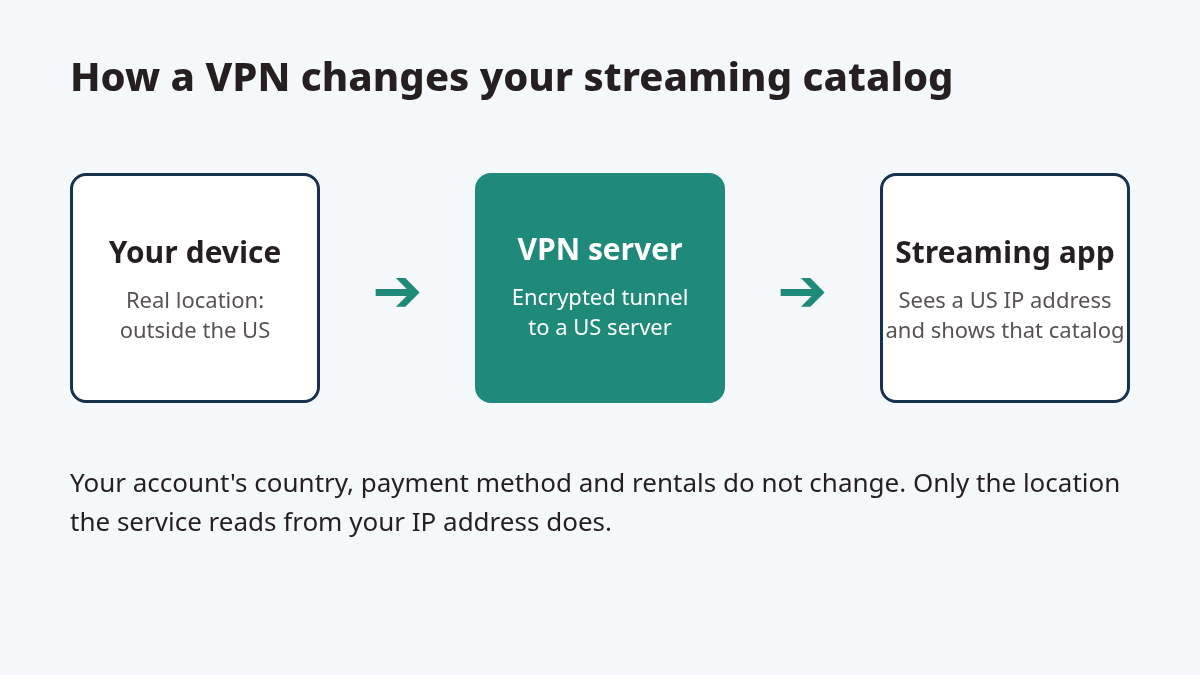
Netflix and Amazon Prime Video both decide what you can watch by looking at your IP address. A VPN changes the country that address points to, so the catalog you see can change with it. The catch is that both services block the VPN servers they recognize, which means a VPN that worked last month can fail this month.
This guide covers five VPNs that independent testers found working with both services in late 2026, explains how we picked them, and shows how to set one up. If you already have a VPN and Netflix shows an error, start with our Netflix VPN or proxy error fix.
How we chose these VPNs
We did not run our own streaming tests for this article, and we are not going to pretend otherwise. The picks are based on published tests from outlets that did test these services, and we kept the VPNs that held up across more than one source and covered both Netflix and Prime Video.
- Gizmodo, “Best Netflix VPN 2026” (published Nov 18, 2026) and “Best VPN for Prime Video 2026” (published Nov 2, 2026). These supply the library counts, speed figures and most of the prices below.
- heise Download, VPN comparison (updated Nov 19, 2026), which checks Netflix and Amazon Prime in Germany and the US.
- TechRadar, Black Friday VPN ranking (published Nov 27, 2026), for a second view on the big four providers.
Every figure in this article is attributed to the source that reported it. Streaming services change their blocking all the time, so treat the results as a snapshot from late November 2026, not a promise.
The quick answer
- Best overall: NordVPN. It tops the Gizmodo Netflix and Prime Video lists and TechRadar calls it the streaming champion among the big four.
- Best for simple apps and far-away servers: ExpressVPN.
- Best value and best for big households: Surfshark, with no device limit.
- Best for privacy: Proton VPN, with a slightly weaker streaming record.
- Best for beginners on a budget: CyberGhost, with mixed results in heise’s tests.
The five VPNs compared
Netflix and speed numbers come from Gizmodo’s November 2026 tests. Prime Video results come from its Prime Video test. Prices are the “from” prices on long plans as Gizmodo listed them, and renewal prices are usually higher, so check the provider’s page before you buy.
| NordVPN | ExpressVPN | Surfshark | Proton VPN | CyberGhost | |
|---|---|---|---|---|---|
| Main Netflix libraries unblocked (of 10) | 10 | 10 | 10 | 9 | Not in that test |
| Prime Video US catalog | Unblocked, rare detections | Unblocked, rare detections | Unblocked | Unblocked | Unblocked |
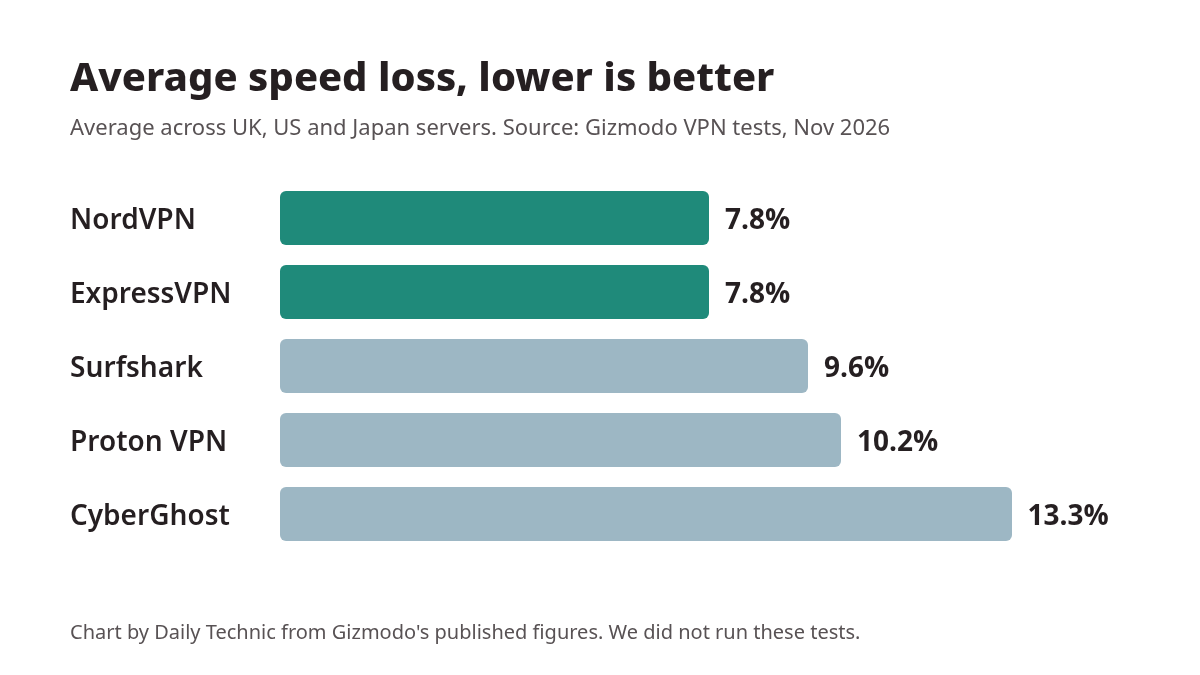
| Average speed loss | 7.8% | 7.8% | 9.6% | 10.2% | 13.3% |
| Smart DNS for TVs | Yes | Yes (MediaStreamer) | No | No | No |
| Simultaneous devices | 10 | 10 to 14 | Unlimited | 10 | 7 |
| Lowest price on a long plan, per month | About $3.50 | About $3 | About $2.50 | About $3 | About $2 |
The best VPNs for Netflix and Prime Video, reviewed
1. NordVPN: best overall
NordVPN unblocked all 10 main Netflix libraries in Gizmodo’s tests and, across 14 streaming services, unblocked all 14. On Prime Video it worked with only occasional detections, and when one appeared its browser extension fixed it by matching the browser’s reported location and time zone to the server. It tied for the lowest speed loss at 7.8%.
It also has Smart DNS, which helps on a smart TV or game console that cannot run a VPN app, plus a Fire TV app. heise rates it as working for Netflix and Amazon Prime in both Germany and the US, with a qualified result for Amazon in the US. The downside is the renewal price, which rises sharply after the first term. Gizmodo suggests the two-year Basic plan at under $3.50 a month.
2. ExpressVPN: best for simple apps
ExpressVPN also unblocked all 10 main Netflix libraries and all 14 streaming services in Gizmodo’s tests, with the same 7.8% speed loss as NordVPN. Gizmodo recorded its Japan server at 163.94 Mbps, the best Japan result it saw, which matters if you want a far-away catalog without buffering. Prime Video worked with rare detections.
The apps keep settings to a minimum and connect in one click, and MediaStreamer, its Smart DNS, covers TVs without an app. heise gives it a clean streaming tick in its comparison. Gizmodo notes it could not unblock Netflix Malaysia or the Philippines, and that you get little room to customize. Its Basic plan is about $3 a month on the 28-month term.
3. Surfshark: best value for many devices
Surfshark unblocked all 10 main Netflix libraries and 13 of 14 streaming services in Gizmodo’s tests, and its Prime Video result was unblocked. Speed loss averaged 9.6%. There is no device limit, so one subscription covers every phone, laptop and TV in the house.
It has no Smart DNS, so a TV without the app needs a router setup or a shared connection from a computer. heise gives it a qualified tick for streaming rather than a full one. The renewal price rises more than most. Gizmodo lists it from about $2.50 a month for the first 27 months.
4. Proton VPN: best for privacy
Proton VPN is based in Switzerland, has open-source apps and an audited no-logs policy. In Gizmodo’s tests it unblocked 9 of the 10 main Netflix libraries (Turkey was blocked) and 10 of 14 streaming services, and Prime Video worked. Speed loss averaged 10.2% with its VPN Accelerator turned on.
There is no Smart DNS, so TVs need the native app on Android TV, Fire TV or Apple TV, or a router. It costs about $3 a month on the two-year term. Pick it if privacy matters as much as streaming. If you want the widest set of catalogs, NordVPN or ExpressVPN is the safer buy.
5. CyberGhost: best for beginners on a budget
Gizmodo’s Prime Video test found CyberGhost unblocked, and its apps label servers for specific streaming services, which helps first-time users. It had the biggest speed loss of the five at 13.3%, covers 7 devices and costs about $2 a month on a long plan.
The evidence is more mixed here. In heise’s comparison, CyberGhost works for Netflix, but Amazon Prime failed on a German server and got only a qualified result on a US one. If you pick it, test Prime Video during the money-back window.
VPNs to skip for this job
- Private Internet Access: Gizmodo found it a cheap way into 11 Netflix libraries, including the US, but it failed on Prime Video and could not unblock Netflix Japan, Brazil, South Korea or Turkey.
- Mullvad: heise rates it strongly for anonymity but its streaming results are poor: a qualified result for Netflix in Germany, and no unblocking of Netflix in the US or of Amazon Prime in either country.
- Free VPNs: they come with limits and few are built for streaming. See our guide to free VPNs for streaming for what is realistic.
How to set up a VPN for Netflix or Prime Video
- Subscribe to a plan with a money-back guarantee. Gizmodo notes NordVPN covers all plans with 30 days.
- Install the app on the device you watch on. For a smart TV, use the native app if there is one, or Smart DNS or a router setup if there is not.
- Connect to a server in the country whose catalog you want. Use the streaming-labeled servers if your VPN has them.
- Clear your browser cookies and cache, or use a private window, then open Netflix or Prime Video.
- If you see a proxy error or a region message, switch to another server in the same country, then try the browser extension if your VPN has one.
Troubleshooting
- Netflix shows a proxy or VPN error: follow our Netflix VPN or proxy error fix.
- The VPN says it is connected but nothing loads: see VPN connected but no internet.
- Prime Video still shows the wrong catalog: a VPN changes the location the service sees, not your account’s country. Rentals, purchases and channel add-ons still follow the country and payment method on your Amazon account, according to Gizmodo.
Frequently asked questions
Is it legal to use a VPN for Netflix or Prime Video?
VPNs are legal in most countries, but they are restricted in a few, so check the rules where you live. Streaming services license content country by country, and using a VPN to get around that may break their terms of use. Possible results include an error message or a blocked session. Read the terms before you rely on it.
Will a VPN slow down my streaming?
Slightly. In Gizmodo’s tests the average speed loss ranged from 7.8% to 13.3% across these five. Gizmodo says Netflix recommends 15 Mbps for 4K, so a decent home connection should still have headroom.
Can I use a VPN on a smart TV?
Yes, in three ways. Use the VPN’s own app on Android TV, Fire TV or Apple TV. Use Smart DNS, which NordVPN and ExpressVPN offer. Or set the VPN up on your router.
Why did my VPN stop working with Netflix?
Netflix blocks the server addresses it recognizes. Try another server, clear cookies, update the app, or contact the VPN’s support, since the better providers replace blocked servers quickly.
Bottom line
If you want one VPN for both services, NordVPN is the best-supported pick in the sources we read, with ExpressVPN right behind it. Choose Surfshark if you have many devices, Proton VPN if privacy comes first, and CyberGhost only if budget matters most and you test Prime Video within the refund window. Whatever you choose, use the money-back period to confirm it works on the services and in the country you care about.
Sources checked on Nov 28, 2026: Gizmodo “Best Netflix VPN 2026” (https://gizmodo.com/best-vpn/netflix), Gizmodo “Best VPN for Prime Video 2026” (https://gizmodo.com/best-vpn/amazon-prime-video), heise Download VPN comparison (https://www.heise.de/download/specials/Anonym-surfen-mit-VPN-Die-besten-VPN-Anbieter-im-Vergleich-3798036), TechRadar Black Friday VPN ranking (https://www.techradar.com/vpn/vpn-services/i-ranked-the-big-four-vpns-this-black-friday-heres-which-of-nordvpn-expressvpn-proton-or-surfshark-actually-wins). Prices and results change; verify on the provider’s site before buying.